A carrot can be an ingredient, a lesson or the reason a child goes looking for a shovel. For Power Full Kids, I wanted growing and cooking to feel connected. The creative question was how to turn the charity’s curriculum into actions: choose a tool, grow something, bring it into the kitchen and make a meal.
At Groove Jones, we built Power Full Kids for President’s Choice Children’s Charity, alongside Sunny’s Bee-utiful Food Adventure. The browser game sits within a much larger platform: lessons and assessments, recipes, food-history content, meal planning, calendars and content creation. My creative and product direction had to connect the child exploring that world with the educator preparing what happens next.
Give each recipe its own job
Early in development, the growing and cooking ideas were separate games. I asked us to bring them into one experience and identify which parts of growing mattered most. There was more curriculum than we could sensibly put into every interaction. Before mapping the game logic, I needed the client’s recipes; they would tell us which ingredients, tools and steps the experience actually needed.
The educational framework was the three C’s: Clean, Careful and Confident. I organized those points and raised a pacing question with the client: did every recipe have to cover every point, or could each emphasize the ones that suited it? Repeating everything would make the game longer and the recipes less distinct. The client agreed to emphasize the relevant points, with reminders of the others. I also chose carrots as one of the growing components while the client supplied the curriculum priorities.
That gave the game three authored recipe levels, each with its own sequence and interactions. These are designed game experiences; they are separate from the website’s editable recipe library. Adding a recipe to the library does not create a new playable level. That distinction matters when you decide what needs to be authored, illustrated and programmed.
Make the next action understandable
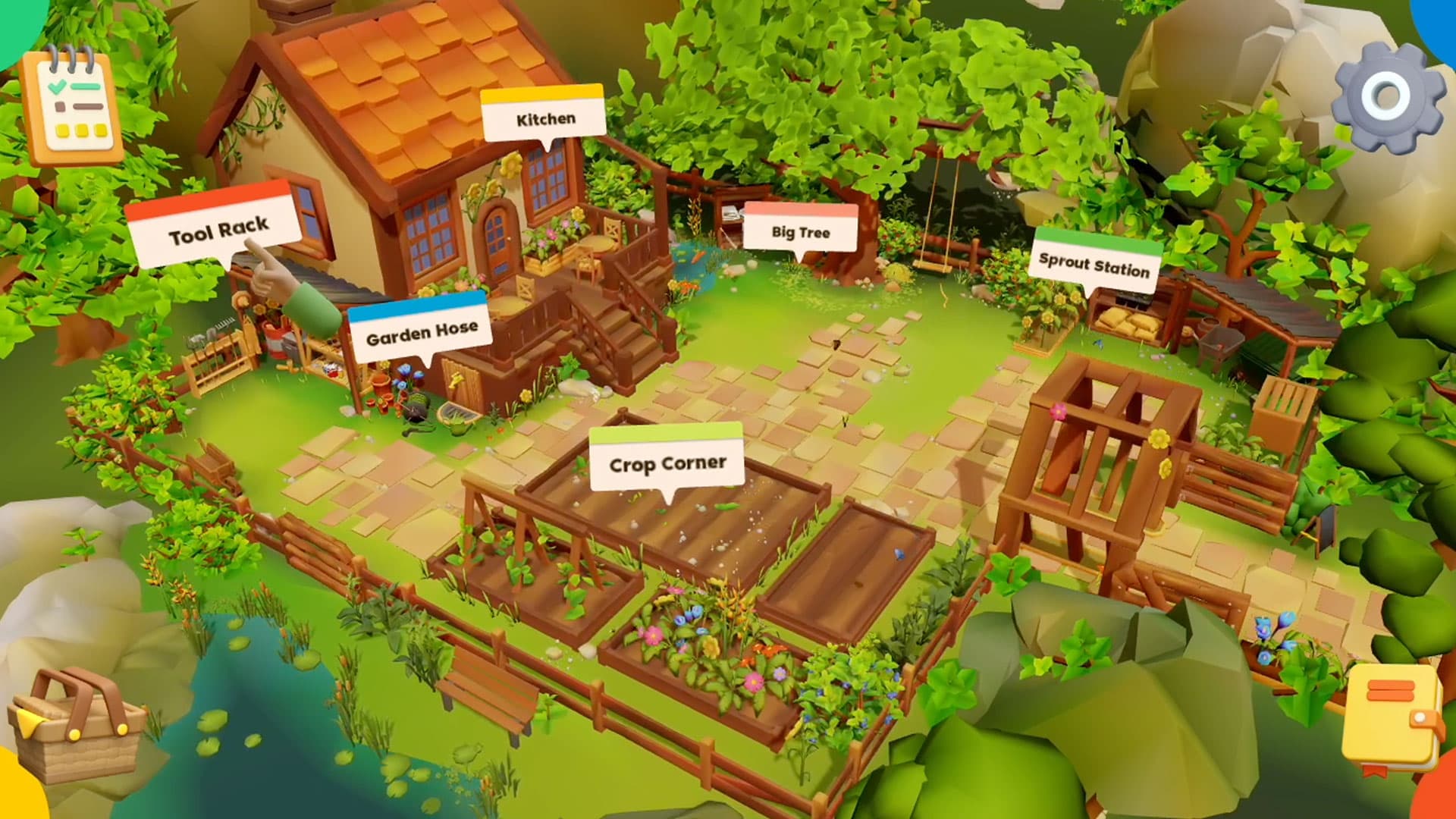
Sunny’s adventure is a point-and-click game. Players choose a cursor and can Grow and Cook or go straight to Cooking. That choice lets a session begin in the garden or the kitchen. The tutorial copy was structured around the route taken, so a player arriving from the garden did not need every instruction repeated. Even a friendly bee can over-explain.
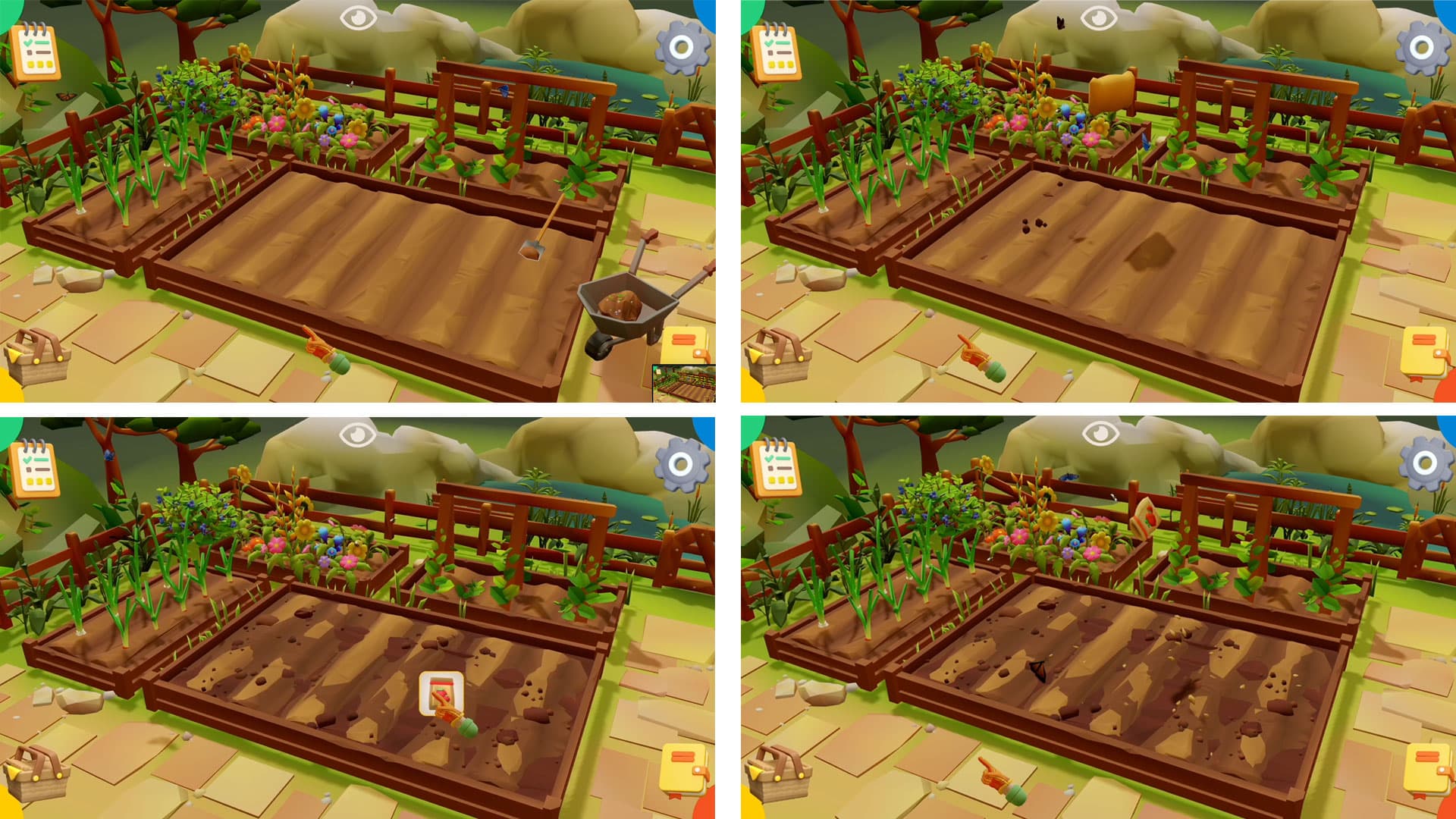
In the garden, the tool rack turns preparation into something to explore. Players collect the tools they need, follow a checklist and use their inventory as they work through planting and growing. The captures show tasks such as preparing soil, placing seeds and watering the growing carrots. The game also brings cleanliness and protection into the choices, with achievements recognizing useful decisions.
I cared about how those small interactions added up. During production, the team brought me decisions about consistency between inspecting an item and picking it up. Later, I asked us to review the whole game for confusing events, missing sound and art, and logic steps that needed adjustment. A checklist can tell someone what remains; the interaction still has to explain what to do now.
One small tool choice made that question concrete. In a November review, the team flagged a screwdriver instruction that was too vague. Marley offered to let either screwdriver work. I chose to keep the distinction, but asked us to name the required type in the instruction book and explain the wrong choice in the error message. If the game asks someone to notice a difference, it has to give them a fair way to understand it.
The kitchen carries the ingredient into a different set of actions. Players gather ingredients and equipment from areas such as the pantry and workspace, then follow the recipe through preparation and cooking. The interface pairs the room with a recipe checklist. Cutting, cooking and serving give the food a visible progression; the finished dish and score give the level an ending. I also flagged missing Sunny animations tied to kitchen achievements: those moments carried educational content, so their absence changed what the game was teaching.
Give educators something to work with
The game needed a platform around it. Lessons and assessments give educators structured material, with notes to support teaching. The recipe library provides ingredients and quantities that can be adjusted for the number of people being served. This is where a food topic can become something a group actually prepares, rather than ending when the browser game closes.
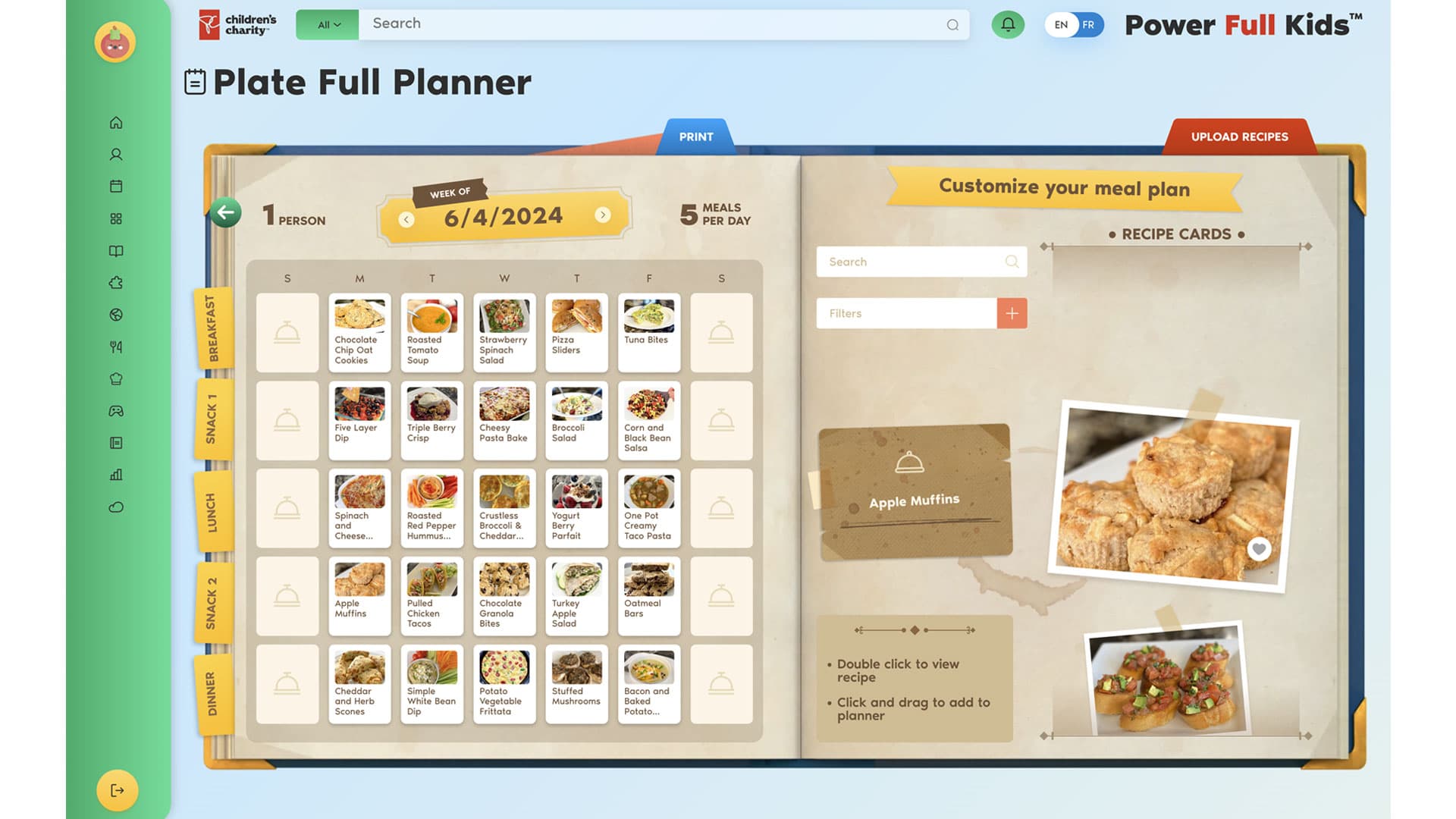
Plate Full Planner makes those recipes usable across a week. Recipe cards can be dragged into meal slots, rearranged and turned into a plan. Calendar and group tools support scheduling, while the grocery list brings the ingredients together. I broke client reviews into smaller parts, including the planner and assessment UX, so these sequences could get specific attention. A meal planner has quite enough to organize without making its own interface another chore.
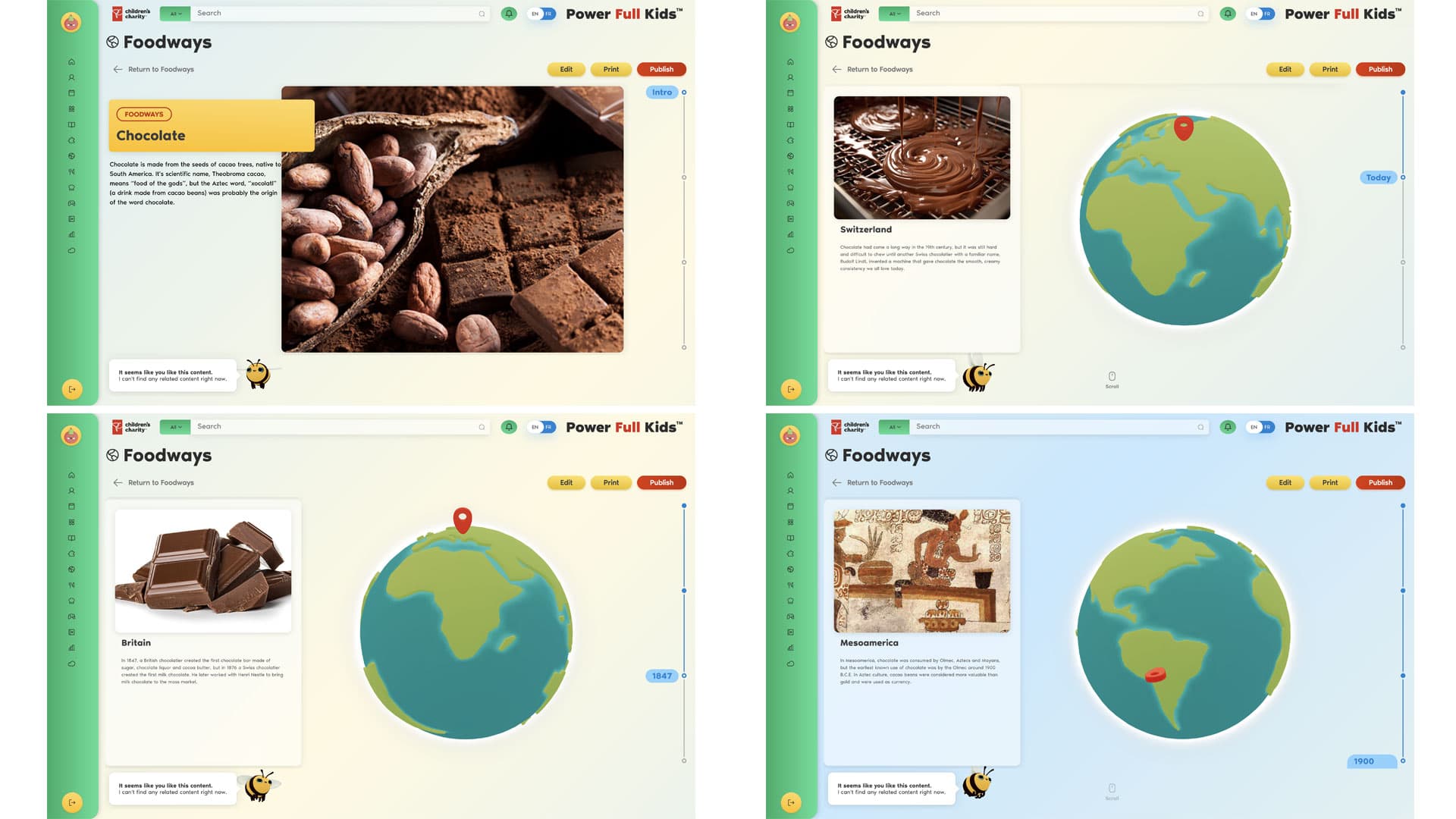
There are other ways into the subject, too. Foodways uses a globe and timeline to explore where foods come from and how they reached our plates. Mealtime Moments uses trivia cards. Alongside the garden and kitchen, those formats give the platform room for history, conversation and practical preparation. English and French content extends across the platform; the learning material and the interface both needed that consideration.
Let the charity keep building
I also wanted the charity to keep adding material. Our custom content builder uses reusable blocks arranged into slide-based lessons and activities. In the early UX reviews, I asked for templates showing how entered data would appear to users. Reviewing the editor beside its result made the content structure tangible: what the author supplies, where it appears and what someone else is expected to do with it.
That independence had to include the ordinary business of saving work. When the client asked about entering content during a period of reported issues, I recommended a pause while the team addressed them. Giving someone an editing account is a start; they also need a dependable workflow and guidance. This became one part of a broader creative responsibility: make the platform usable for the people who will keep it alive.
Follow one ingredient all the way through
Bip’s interface work, Laura Riondet’s art direction and game UX, and development across the Groove Jones team brought these parts together. My job was to keep the connections in view: curriculum to game logic, action to feedback, recipe to meal plan, and client input to a usable lesson. Those connections were worth reviewing together, even when different people were building each part.
For another learning experience, I would start with one real ingredient and follow it through the proposed system. What does the child do with it? What guidance appears at a difficult step? What can an educator teach, plan or prepare from the same material? Then put that content through the authoring tool and inspect the result. A feature earns its place when you can show the action it supports and how someone gets to the next one.